Private browser workflow
Palworld save editor online with a visible safety trail.
Palworld Save Editor Online opens the save workflow in your browser without sending raw files to an upload server. It freezes the original, names every planned change, and blocks export when a required check fails. The live edit loop supports the sample, Pal Save Editor JSON fixtures, and PlZ Beta editing of Pals, players, inventory, progress, guilds, and bases in qualifying Steam or dedicated-server worlds.
Open a save to edit a Pal
Include Level.sav and linked player files. After recognition, this task returns directly to the Pal editor.
Real Pal stats, level, condensation, souls, passives, moves, gender, and nickname can be edited, checked, and exported, and a Pal can be copied, removed, moved between party and Palbox, or given to another player. Species and base assignments stay locked.Quick answer
Palworld save editor online: what to know first
- Use the editable sample to understand the complete change, validation, backup, and receipt loop before replacing any world copy.
- A qualifying PlZ2 / 0x32 Level.sav opens with named players and Pals. You can change Pal stats and skills, your character, inventory items, guilds, and bases; add the Players file for technologies, the Paldeck, and fast travel.
- The original model is frozen; only allowlisted fields can appear in the Change Plan.
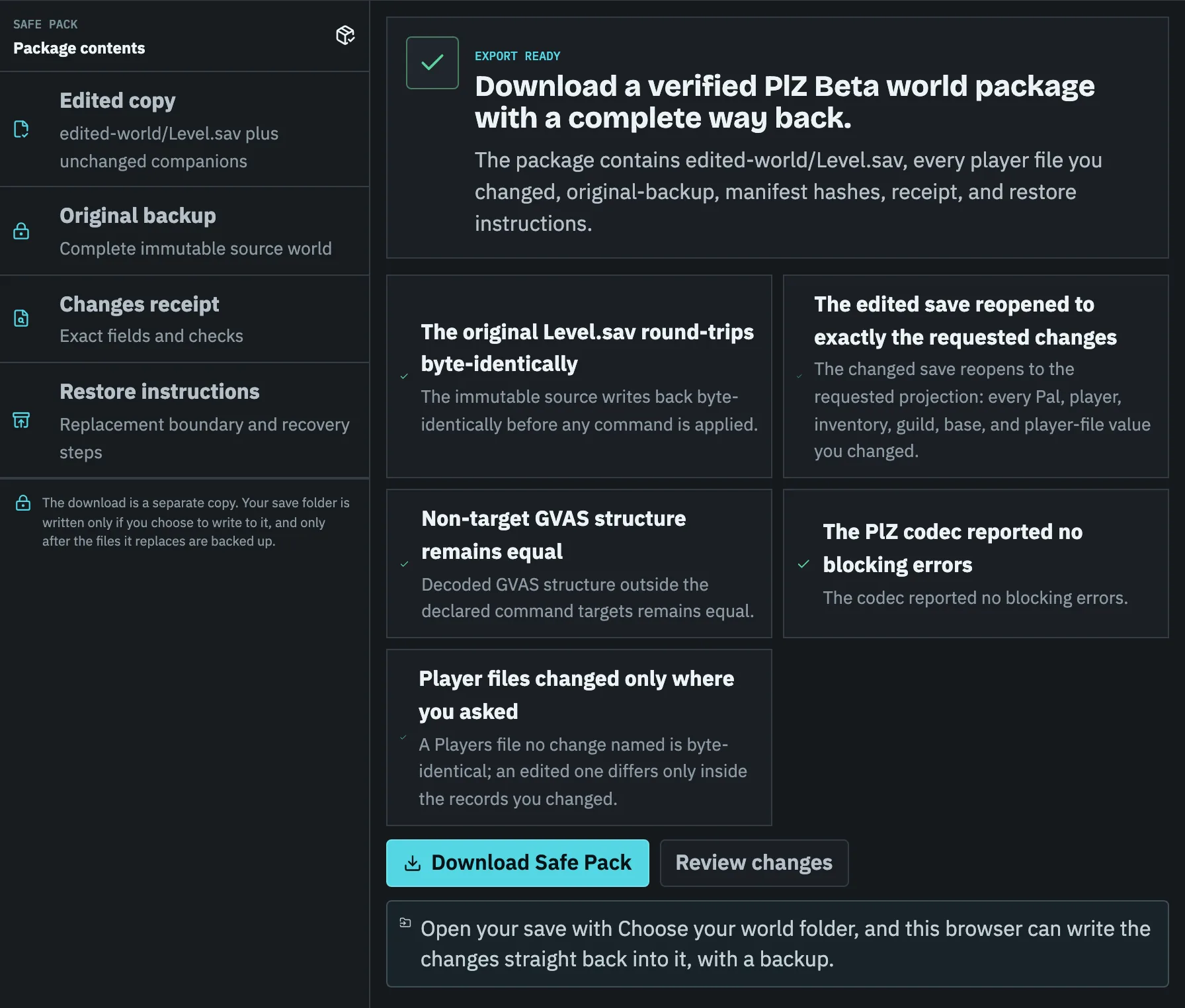
- Every export is a Safe Pack: the edited files, an untouched original backup, a change receipt, and restore steps.
What Palworld Save Editor Online can do now
The browser tool accepts `.sav`, ZIP, and the documented `pal-save-editor-world/1` JSON fixture. It inventories file paths, identifies Level.sav and player-file candidates, detects outer signatures, calculates a local SHA-256 based Worldprint, and returns a Recognition Receipt with an explicit capability state.
For the editable sample and JSON fixture, the current UI can change documented Pal, player, and inventory fields through the shared exact-path diff and six-check export gate. Qualifying PlZ Beta worlds expose named player and Pal projections and write Pal stats, skills, souls, and nicknames, player records, inventory items, technologies, the Paldeck, fast travel, and guild and base records. The PlZ Safe Pack includes the edited world, untouched original backup, Change Receipt, manifest, and restore instructions.
| Input | Recognize | Edit | Export |
|---|---|---|---|
| Editable sample | Yes | Yes | Fixture safe pack |
| Pal Save Editor JSON | Yes | Allowlisted fields | JSON + backup + receipt |
| Qualifying PlZ2 / 0x32 world | Named player and Pal projections | Pals, players, inventory, progress, guilds, bases | Edited world + backup + receipt + manifest |
| Qualifying PlM / Oodle world | Decompressed in your browser, then the same projections | Pals, players, inventory, progress, guilds, bases | Edited world written as PlZ + backup + receipt + manifest |
| Other PlZ / CNK / raw GVAS save | Header and file-set evidence | Locked | Recognition Receipt only |
| Unknown save | Format fingerprint | Locked | Recognition Receipt only |
A save editor should separate five different claims
Many tools compress recognition, parsing, editing, rebuilding, and game loading into a single word: supported. Those are separate engineering milestones. A parser can display values and still lose unknown bytes on write. A rebuilt file can parse again and still fail when Palworld loads dependent RawData.
Pal Save Editor reports the last verified stage instead of upgrading a partial success into a blanket compatibility promise. That gives you a usable answer even when the correct answer is read-only diagnosis.
- Recognition: identify file role, platform clues, and PlZ, PlM, CNK, or GVAS signals.
- Read: turn every required byte into a bounded structured model.
- Write: rebuild the same format without discarding unknown data.
- Round-trip: re-open the export and prove non-target regions stayed unchanged.
- Game load: verify the current Palworld version actually accepts the result.
Preview the exact Palworld save change
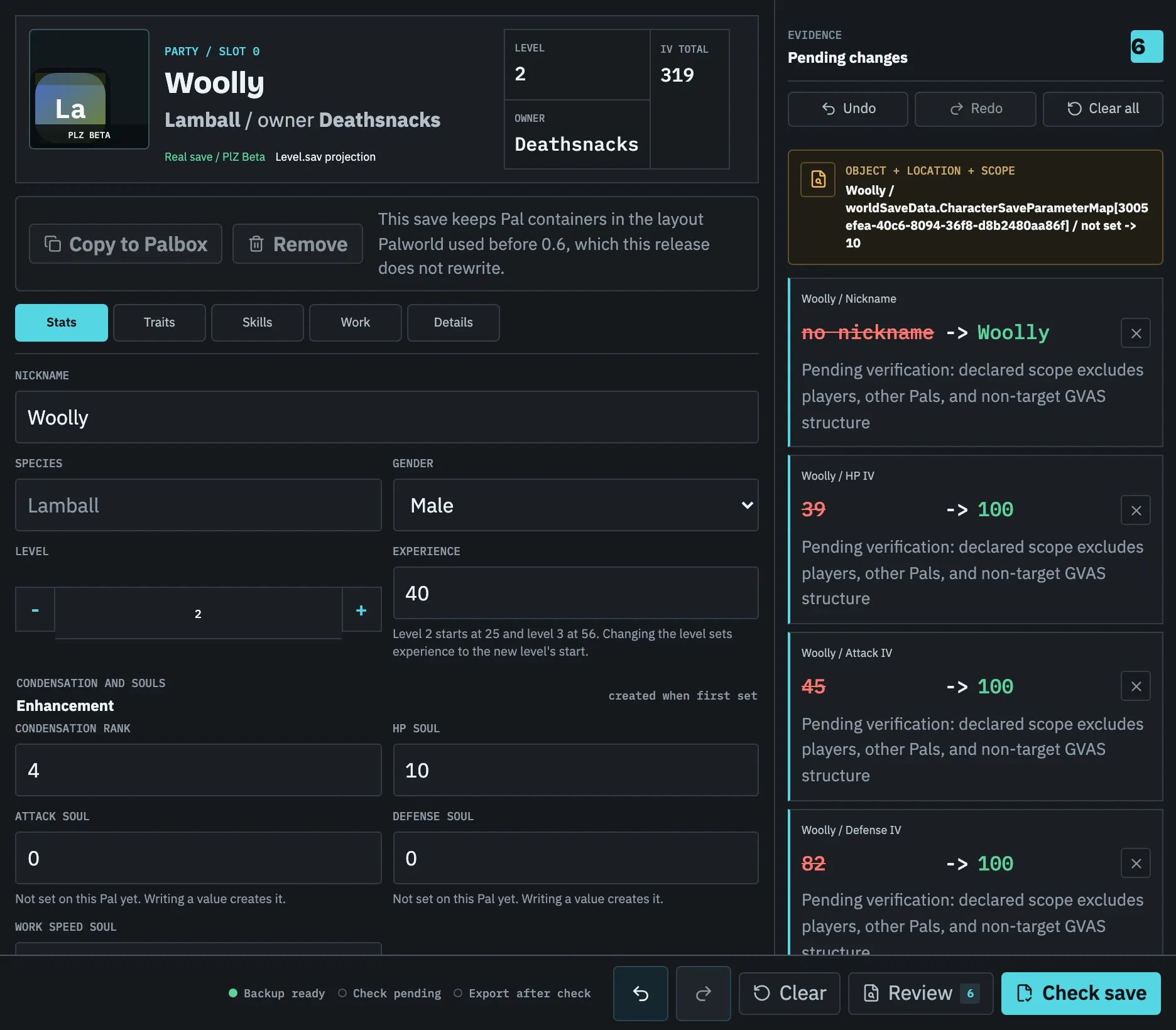
A useful Palworld save editor answers both sides of the change: what will move and what will remain untouched. Each pending change names the object and field with its previous and new value; the evidence panel keeps the exact save path, and Advanced details the source hash and receipt ID, available for technical review.
In the example below, one Pal in a real save gets a new nickname, three IVs raised to 100, a condensation rank, and an HP soul. Each change states the scope it leaves out, and Check save later verifies that claim against the reopened copy.
Run the validation gate before download
The validation gate is intentionally stricter than form validation. Structure checks require the expected top-level model. Reference checks verify that owner and related IDs still point to known records. Identity checks reject duplicates. Legal-value checks enforce supported ranges and types. Scope lock rejects any changed path that was not exposed by the visible editor.
Round-trip checks serialize the fixture, parse it again, and compare the rebuilt model. PlZ Beta separately proves unchanged round-trip, changed reparse, allowlisted command scope, non-target equality, and package hashes.
Use the online Palworld save editor without losing your way back
The safest replacement process is short and repeatable: stop writes, copy the full world folder, scan the copy, make one scoped plan, validate it, and keep the receipt beside the export. Do not edit the only copy and do not mix a new Level.sav with unrelated Players files.
After replacing a test copy, verify player level, inventory, technology, Pals, guild membership, bases, map progress, and world options in game. Keep the previous active folder until every important account has confirmed the result.
- 01
Stop the game or server
Prevent autosaves and cloud synchronization from changing the reference files while you copy them.
- 02
Back up the complete world
Keep Level.sav, metadata, Players, and world options from the same WorldID together.
- 03
Scan and limit the scope
Confirm the platform, format, object count, and exact fields that may change.
- 04
Validate and retain the receipt
Do not replace files when a required check fails or the requested operation remains locked.
- 05
Test the exported copy in game
Confirm high-value identities and assets before deleting any recovery point.
Task checklist
- 01Use the editable sample to understand the complete workflow before relying on a real save diagnosis.
- 02Back up the complete matching world folder, not only Level.sav.
- 03Confirm the Scope Map and every changed path before validation.
- 04Keep export blocked if references, identity, values, scope, or round-trip checks fail.
- 05Keep the Safe Pack backup until you are satisfied with the edited world.
Questions people ask before touching the save
Is Palworld Save Editor Online free?
Yes. Local file recognition, the editable sample, JSON fixture editing, validation, receipts, and local Save Chronicle are available without an account. Raw save files are not uploaded to this static site.
Can I edit a real Level.sav in this release?
Yes, inside the PlZ Beta boundary: a qualifying Steam or dedicated-server PlZ2 / 0x32 world can change a Pal's level, experience, IVs, work speed, sanity, fullness, condensation rank, souls, gender, nickname, passive skills, and moves; your character's level, experience, name, and stats; and guild and base names, camp level, and radius. With the matching Players file you can also change inventory items - quantities from 1 to 9,999,999, adding, removing, and moving them between containers - plus technology points, unlocked technologies, the Paldeck, and fast travel, and copy, move, or give away a Pal. Species, putting a Pal to work at a base, unique weapons and armour, other formats, and other fields remain locked.
Why not use an existing Oodle WASM file?
Some public implementations are GPL and can be used commercially only while meeting source and copyleft obligations; others have unclear or education-only terms. Compliance and repeatable round-trip evidence both need to pass.
What is included in the downloadable safe pack?
A fixture pack includes changed JSON, untouched original, receipt, and recovery README. A PlZ Beta pack includes edited-world, original-backup, CHANGE-RECEIPT.json, manifest.json, and restore instructions. Unsupported inputs export only diagnostic evidence.