Error fingerprint SAVE-NOT-LOADING
Palworld save not loading: stop writes before trying another fix.
When a Palworld save is not loading, repeated launches can create new autosaves or rotate out older backups. Stop the game or server, copy the active world and every candidate recovery folder, then classify the symptom. A missing world, return to menu, level 1 character, and parser error point to different evidence. Pal Save Editor inventories file roles, sizes, signatures, and player counts; you compare candidate snapshots and choose which copy to test.
Compare your current save with a backup
Open the active world first. You can then add a complete recovery candidate without changing either source.
Snapshot comparison and recovery-candidate evidence are available. Binary repair and automatic restore are not.Quick answer
Palworld save not loading: what to know first
- Stop launching the world until the active and backup folders have been copied elsewhere.
- A world that loads with a new character usually indicates identity mismatch, not a missing Level.sav.
- Compare complete snapshots by file count, Level.sav size, Players coverage, signatures, and timestamps.
- Restore a test copy and verify every high-value object before replacing the active world permanently.
Classify the Palworld save not loading symptom
If the world is absent from the menu, inspect the WorldID folder, metadata, account path, and cloud synchronization. If loading returns to the menu or crashes, inspect Level.sav size, container signal, companion files, and known-good backups. If the world loads but the player starts at level 1, focus on Players files and identity mapping.
A tool error belongs in a separate branch. `EOF not reached` can mean the parser is behind the game version. `PlM instead of PlZ` means the tool expected zlib but found Oodle. Neither message proves that the original game file needs to be rewritten.
| Symptom | Check first | Avoid |
|---|---|---|
| World missing | Correct SteamID / WorldID or WGS account path | Creating more worlds before backup |
| Returns to menu | Level.sav size, format, complete backup | Replacing one file from a different snapshot |
| Level 1 character | Old and new Players identities | Deleting the newly created target file |
| Parser error only | Tool and game version | Assuming the game save is corrupt |
Preserve every Palworld recovery point
Copy the active WorldID or WGS folder outside the save path before another launch. Copy timestamped backups as complete folders. On a dedicated server, stop the process before downloading files. On Game Pass, close the Xbox app so cloud synchronization is not replacing the WGS copy while you inspect it.
Keep a simple inventory for each candidate: snapshot time, file count, total bytes, Level.sav size, Players count, container signature, and whether it was ever confirmed in game. This prevents a newer partial snapshot from outranking a slightly older complete world.
- 01
Stop the game or server
Prevent new autosaves and backup rotation while evidence is still available.
- 02
Copy active and backup sets
Preserve full folders outside the live path and label each snapshot.
- 03
Scan the file set
Check roles, sizes, signatures, missing companions, and player coverage locally.
- 04
Choose the least-loss candidate
Prefer a complete coherent snapshot over the newest isolated file.
- 05
Restore into a test slot
Verify the world before changing the active directory permanently.
Use local diagnosis before replacing Level.sav
Pal Save Editor recognizes common file roles and PlZ, PlM, CNK, or GVAS signals, flags unexpectedly small files, counts player-file candidates by path and files found under backup paths, and creates a redacted receipt. It does not upload the raw save or invent a binary repair when the format is unsupported.
The diagnostic result can distinguish a missing backup, tiny Level.sav, unsupported PlM path, and incomplete player set. That evidence is more useful than trying random files because each issue changes the safe next step.
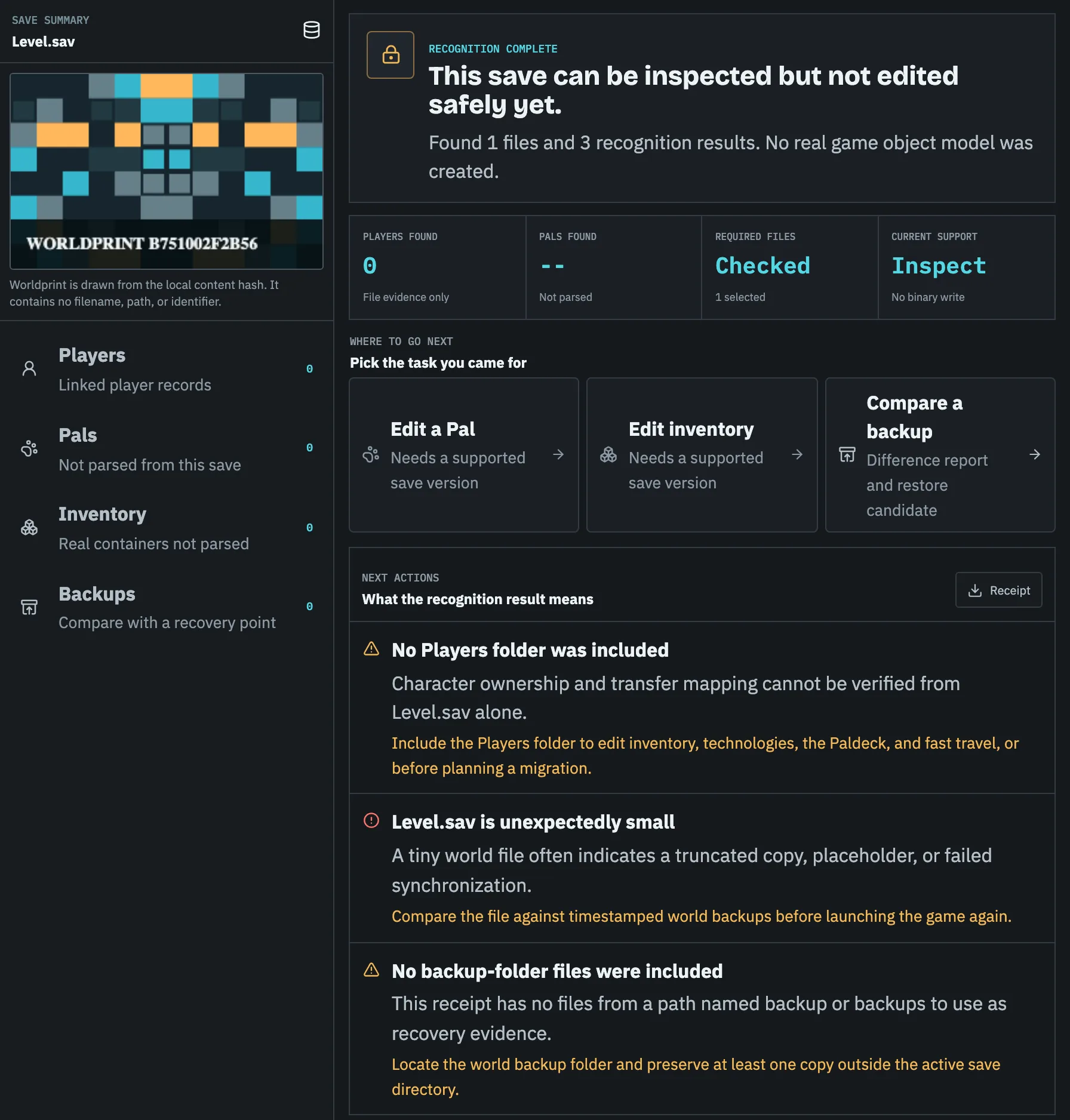
Confirm the restored Palworld world before making it permanent
Load the restored copy, then verify player level, inventory, technology, Pals, guild membership, bases, map progress, fast-travel points, and world options. On multiplayer worlds, ask several accounts to confirm because one identity can recover while another remains disconnected.
Keep the previous active folder and the selected backup until the important accounts have confirmed the result. Record the game version and restored snapshot. If the world fails again after a future update, that receipt gives you a known-good baseline.
Task checklist
- 01Stop the game or server.
- 02Copy active and backup folders elsewhere.
- 03Scan file count, size, signatures, and player companions.
- 04Restore a complete candidate as a test.
- 05Verify in game before deleting any recovery point.
Questions people ask before touching the save
Should I keep trying to launch the world?
No. Stop and preserve the current files first, especially when backup rotation may overwrite older copies.
The world loads but my player is gone. Is the world corrupt?
Possibly not. That symptom commonly points to a player identity mismatch rather than a missing world.