Error fingerprint PLM-INSTEAD-OF-PLZ
Palworld PlM instead of PlZ means the tool opened the wrong compression path.
The Palworld PlM instead of PlZ error appears when a tool expects an older zlib container but finds a newer Oodle-compressed save. The file is not repaired by changing three header letters or renaming it to Level.sav - the payload really is compressed differently. Pal Save Editor now opens a PlM save directly in your browser and writes the edited copy back as a zlib save, which the game also loads. Keep the original world untouched either way, and confirm whether Palworld itself still loads it.
Open a save to see its world summary
We will identify the files, version clues, completeness, and tasks available for this exact input.
Compatible PlZ Beta worlds can expose named players and Pals; unsupported formats receive diagnostic evidence.Quick answer
Palworld PlM instead of PlZ: what to know first
- PlZ uses zlib; PlM uses Oodle. The payloads require different decompression code.
- Editing `PlM` to `PlZ` makes the header lie and cannot convert the compressed bytes.
- A PlM decoder alone is not enough: the tool also has to read and rewrite the current GVAS and Palworld RawData, which is where most tools stop.
- If the game loads the save, keep it untouched and treat the error as tool incompatibility.
Palworld PlM instead of PlZ: why the error appears
Older Palworld save tools were built around PlZ, a zlib-compressed container. Palworld moved many saves to PlM/Oodle starting around version 0.6. A PlZ-only tool reads the marker at the expected offset, finds different bytes, and stops before decompression.
GitHub issue search now returns repeated `PlM instead of PlZ` reports across host-fix and save-tool projects. The recurring message is a compatibility signal: the tool and the save disagree about compression. It is not a command to modify the file header.
| Property | PlZ | PlM |
|---|---|---|
| Compression | zlib | Oodle |
| Common tool support | Broad library support | Tool-specific decoder required |
| Browser licensing | Permissive options available | GPL obligations or unclear component terms |
| Safe writing requirement | RawData round-trip still required | Oodle plus RawData round-trip required |
Why changing PlM to PlZ cannot work
The marker describes how the payload is compressed. Changing `PlM` to `PlZ` does not recompress the payload with zlib; it tells the next tool to apply the wrong decoder. At best the decoder rejects the file. At worst a weak tool continues with invalid sizes or damaged output.
The same rule applies to filenames. A Game Pass WGS container does not become a Steam Level.sav when renamed. Conversion must open every required layer, preserve the full model, rebuild the target format, and verify the result.
Why PlM browser support took so long
A static browser tool distributes its decoder or WebAssembly binary to every visitor. The only open Kraken decoders are GPL-3.0: usable commercially while their source and copyleft obligations are met, which for a site that ships that binary means publishing the source of what ships with it. Pal Save Editor does that - the decoder is vendored with its own source, and this editor is published under the same license.
Licensing was only one gate. Decompressed PlM contains Unreal GVAS and Palworld RawData that changes across versions, so the writer also needs complete input consumption, bounded memory, unchanged round trips, scoped changed round trips, and non-target checks. Those are the checks each edit still passes before an export unlocks.
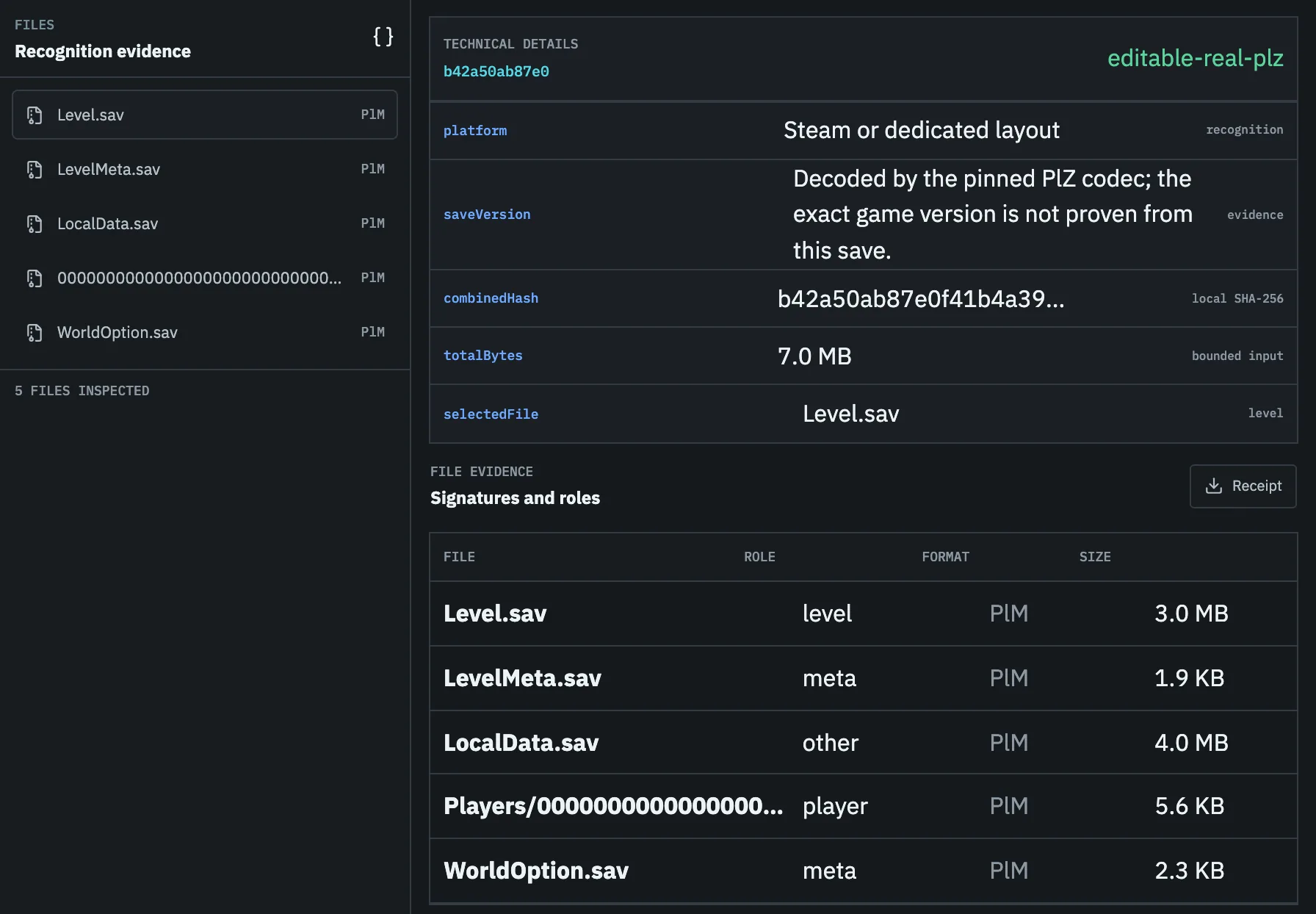
What to do after a PlM instead of PlZ error
First check whether Palworld loads the original file. If it does, preserve it and update the tool only from its trusted upstream. Look for an explicit statement about the current Palworld version, PlM/Oodle support, file role, and write validation. A generic `supports Oodle` claim is not enough.
If the game does not load the save, compare the complete active world with timestamped backups. Restore a complete candidate as a test rather than trying to convert a damaged or unsupported file in place.
- 01
Copy the complete world
Preserve Level.sav, Players, metadata, options, and backups outside the active path.
- 02
Confirm the exact marker
Use a local scanner to distinguish PlM, PlZ, CNK, GVAS, and unknown headers.
- 03
Test the original in game
A successful load points to tool incompatibility rather than required repair.
- 04
Verify the decoder and license
Check current-version support, provenance, and distribution terms before using an export.
- 05
Require round-trip evidence
Do not replace the save unless the tool can rebuild, reparse, and give you a backup to restore.
Task checklist
- 01Do not change PlM to PlZ in a hex editor.
- 02Keep the original and full world folder.
- 03Confirm whether the game still loads the file.
- 04Use only a tool that explicitly supports this PlM version.
- 05Require a backup and validation receipt before replacement.
Questions people ask before touching the save
Can I convert PlM to PlZ by editing three letters?
No. The compressed payload uses a different algorithm. Changing the marker makes the header lie about the bytes.
Can Pal Save Editor open a PlM save?
Yes. It decompresses the Oodle container in your browser, edits the save through the same checks as a zlib one, and writes the edited copy back as PlZ, which Palworld also loads.